


Greyhound: Buy Bus Tickets
4.712.59K Reviews
App Specs
- Version
- 9.84.0
- Updated On
- License
- Free
- Downloads
- 1,000,000+
- Developer
- Greyhound Lines Inc
- Categories
- Travel & Local
- Platform
- Android, iOS
Screenshots

 Analysis by AppCompare
I find a bus app most useful when it reduces the small decisions that pile up around a trip: which departure fits, where to keep the ticket, and how to check the plan while I’m on the move. Greyhound: Buy Bus Tickets brings those jobs together for Greyhound travel. It’s a free travel app from Greyhound Lines Inc, and its focus is practical: search for a journey, book it, and keep trip information close at hand.
I’d consider it when Greyhound is already part of the plan, whether I’m visiting family, taking a weekend trip, or connecting two cities without driving. It is less useful as a general bus-planning tool for someone comparing many independent operators or arranging an international itinerary. That distinction matters: the app can make booking with Greyhound simpler, but it doesn’t replace the broader research a complicated trip may need.
Planning and managing a Greyhound journey
The app has a 4.7 average from around 115,000 ratings, and it has been installed over a million times. Those figures suggest it is widely used, but I’d still judge it by whether its booking flow fits my needs. It is rated for everyone, runs on Android 6.0 or later, and version 9.79.0 is the current release. The app’s travel category is a natural fit for anyone who wants to handle bus plans on a phone rather than at a ticket counter.
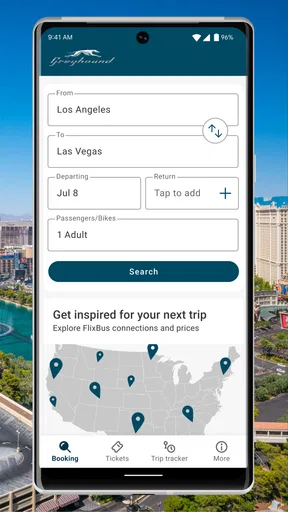
My basic workflow would be to enter the departure and arrival points, choose a date, then compare the displayed trips before paying. I would look beyond the departure time: duration, stops, and listed amenities can change which option feels best. A lower fare is not automatically the better choice if the schedule leaves an awkward wait or the arrival time makes the rest of the day harder.
One useful habit is to check the route and date carefully before moving on to payment. When plans involve a one-way trip, a return journey, or a connection to another form of transport, a small date or station mistake can have a bigger effect than it first appears. I’d take an extra moment to confirm both endpoints and the time against my calendar rather than rushing through a familiar-looking screen.
Booking without losing track of the details
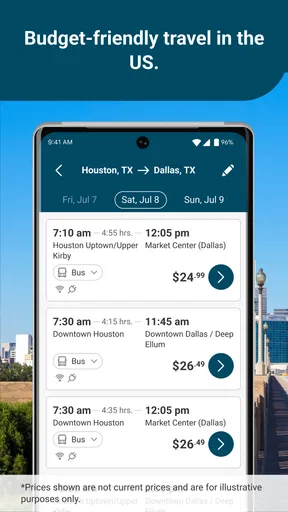
Booking through the app is straightforward. Just enter your departure and arrival points, select your travel dates, and boom! You’re presented with a list of available options. I love how the app provides a quick overview of each trip, including duration, stops, and amenities offered on the bus.
What’s even cooler is the option to apply discounts or promo codes directly in the app. If you’re a frequent traveler or have a promo code lying around, it’s super convenient to just plug it in and save a few bucks.
Worth Reading Before You Choose

EA SPORTS FC Mobile 26 Is a Bigger Football Game, but It Takes Time

Flipboard Shows What News Apps Must Do Beyond the Feed

Switching to Android Auto Means Rethinking Your Driving Routine

Google Calendar Makes a Crowded Week Easier to Manage

Ludo King Makes the Most of the Minutes Between Plans

Baby Panda World Brings Quick Play to Modern Phones, but Its Game Library Feels Busy
My practical tip is to treat a promo code as part of the checkout check, not as a reason to pick a trip before comparing its schedule. I’d also keep any relevant code somewhere I can retrieve it easily before I start booking; that avoids breaking concentration midway through the process. If I’m arranging travel for someone else, I’d verify the traveler and journey details together before completing the purchase.
The app is especially handy for a familiar, direct trip where I already know the cities and simply want to see the available departures. For a less familiar destination, I’d first confirm which station makes sense for my actual plans. The booking screen can help me choose a Greyhound journey, but the wider logistics—how I’ll reach the station and get from the arrival point to my final destination—still deserve separate thought.
Making the phone useful on travel day
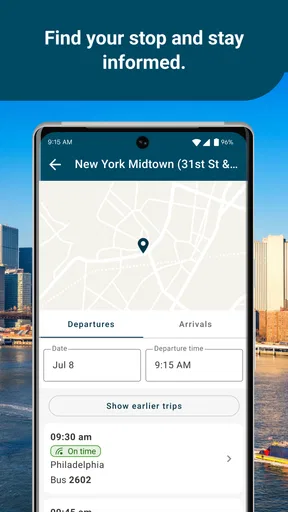
One of the standout features is the ability to track your bus in real-time. Say goodbye to those anxious moments wondering if you’ve missed your bus or if it’s running late. Just open the app, and you’ll have all the updates you need right at your fingertips.
I’d use tracking as a check-in tool rather than a reason to leave for the station at the last possible moment. A phone can lose signal, an update can arrive later than expected, and a live status does not remove the need to be ready for the departure shown on the ticket. Checking the trip before setting out and again while travelling is a sensible routine, especially if someone is meeting me at the other end.
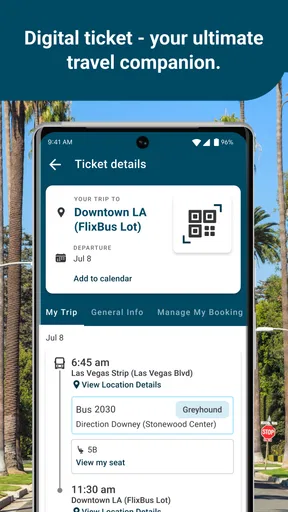
The app’s digital booking is also useful for reducing paper clutter. I’d make sure my phone has enough battery for the journey and open the booking before I reach a crowded station, rather than relying on a last-second login or search. That is a simple preparation habit, not a special feature, but it makes the most of having the ticket on the device.
Interface, alerts, and booking changes
The app’s interface is clean and intuitive. Even if you’re not tech-savvy, you’ll find it easy to navigate. The menu is straightforward, and everything is just a tap away. I especially appreciate the app’s minimalistic design, which keeps things simple and clutter-free.
The app also provides a handy section for managing your bookings. Need to change your travel plans? No problem. Modifying bookings or requesting refunds can be done directly through the app without any hassle.
I would still review the options shown for a particular booking before assuming that every change will work the same way. A request made in the app is convenient, but the outcome depends on the booking and the available choices presented for it. If a trip is time-sensitive, I’d deal with a change as soon as I know the plan has shifted instead of waiting until I’m already on the way to the station.
Notifications are another strong feature. The app sends timely alerts about your trip status, which is a lifesaver when you’re rushing to catch the bus. It’s like having a personal travel assistant that keeps you in the loop every step of the way.
Plus, if you’re ever in a jam or need help, customer support is just a click away. The app lets you connect with support agents via chat or phone, ensuring that help is always within reach.
I’d keep alerts enabled if I want trip updates to reach me without repeatedly opening the app, while still checking the booking directly when a decision depends on the latest status. On a busy travel day, notifications can be easy to miss among other phone alerts, so I wouldn’t treat them as the only place to look. If an issue affects a departure or booking, the in-app support route gives me a direct next step instead of leaving me to search around.
Habits that make repeat trips easier
For someone who takes the same kind of Greyhound journey regularly, a repeatable routine is more useful than trying to rush each booking. I’d keep the destination and date in mind before opening the app, compare the available times in one pass, and check stops and duration before choosing. After booking, I’d revisit the trip details before travel day and make sure the phone is ready to show them.
That routine also helps when plans are flexible. If I can travel at different times, I can compare the options against the rest of my day instead of focusing only on the earliest departure. If I have a strict arrival deadline, I’d prioritize a schedule that gives me a reasonable margin rather than assuming every leg will line up perfectly.
For a realistic example, imagine I’m visiting family for a weekend and need to arrive before an evening meal. I’d search the route and date, compare the trip durations and stops, then choose a departure that leaves some breathing room. I’d keep the booking handy, check the status on travel day, and let the person meeting me know if the displayed information changes. The app supports those steps, while the margin in my schedule protects me from having to make the whole visit depend on a perfect run.
Where the app fits—and where it doesn’t
Compared with buying at a counter, handling the booking on a phone is more convenient when I already know my route and want to plan ahead. Compared with general travel-search tools, this app is more focused on Greyhound bookings rather than presenting itself as a broad comparison of every bus company. That focus is an advantage when I’ve chosen Greyhound; it is a limitation when I’m still deciding which operator or transport mode suits me best.
I’d use a wider travel-planning option when the journey involves several carriers, unusual connections, or a cross-border route. The app is not the right place to assume every possible bus itinerary will appear. The original article’s practical boundary is worth keeping in mind: it is suited to domestic Greyhound trips, while an international plan may call for another source. For a journey with separate rail, local transit, or independent bus legs, I’d compare those pieces outside this app and use Greyhound’s app for the part it handles.
There are also ordinary phone-based trade-offs. Some functions rely on an internet connection, so spotty service can make checking information harder. I’d prepare before entering a low-signal area by opening the booking while I have reliable access. I have also encountered minor glitches, including slow status updates or a freeze; if the app acts up, reopening it and checking again is a reasonable first step, but I wouldn’t rely on a refresh as a substitute for being prepared to travel.
This is a better match for people who book Greyhound often, prefer keeping trip details on their phone, or want an easy way to review available departures. It may not suit someone who needs to compare a wide range of bus operators in one place, has an international itinerary, or expects every travel detail to work offline. Knowing that boundary helps set realistic expectations rather than treating a focused booking app as a complete trip planner.
A few bumps on the road
Of course, no app is perfect. Occasionally, I’ve noticed some minor bugs, like delayed updates on bus statuses or the app freezing up. However, these issues are rare and usually resolved with quick updates from the developers.
Another thing to keep in mind is that while the app is great for booking domestic trips, it doesn’t cover international routes. If you’re planning a cross-border journey, you might need to look elsewhere for those tickets.
Lastly, the app requires a stable internet connection for most of its features, which might be a downside if you’re in an area with spotty service.
My overall advice is to use it for what it does best: search and manage a Greyhound trip, keep the booking accessible, and check updates without making the phone your only travel backup. A little preparation—confirming the route, allowing time at the station, and keeping the battery charged—does more to smooth out the day than repeatedly refreshing the screen.
Final Thoughts: Is It Worth the Download?
All in all, the Greyhound: Buy Bus Tickets app is a fantastic tool for anyone who frequently travels by bus in the US. It’s convenient, user-friendly, and packed with features that make travel planning a whole lot easier. Whether you’re a seasoned bus traveler or someone looking to ditch the car for a bit, this app is definitely worth the download.
So, next time you’re itching for a road trip or need to hop on a bus, give this app a whirl. It might just become your new favorite travel buddy!
Pros
- User-friendly interface
- easy navigation.
- Offers discounts for frequent travelers.
- Real-time bus tracking available.
- Supports multiple payment options.
- Detailed trip information provided.
Cons
- Limited routes in rural areas.
- Occasional app crashes reported.
- No offline mode for ticket access.
- Customer support response can lag.
- Requires stable internet for updates.
FAQs for Greyhound: Buy Bus Tickets
What features does Greyhound: Buy Bus Tickets offer?
Greyhound: Buy Bus Tickets offers a range of features including the ability to search and purchase tickets, view schedules, and access exclusive discounts. The app also allows users to track their bus in real-time and manage their travel itineraries. Additionally, it provides information about Greyhound stations and amenities.
Can I manage my bookings through the app?
Yes, the Greyhound app allows you to manage your bookings with ease. You can view your upcoming trips, modify your reservations, and even cancel tickets if necessary. This flexibility makes it convenient for travelers to handle changes in their travel plans directly from their mobile devices.
Is it possible to get discounts or promotions through the app?
Absolutely! The Greyhound app often features exclusive promotions and discounts for its users. By booking through the app, you can access special deals that might not be available elsewhere. It’s a great way to save money on your travel expenses while enjoying the convenience of mobile ticketing.
How user-friendly is the Greyhound app for new users?
The Greyhound app is designed with a clean, intuitive interface that makes it easy for new users to navigate. From searching for routes to booking tickets, the process is straightforward. Additionally, the app provides helpful prompts and customer support options to assist users who may encounter any difficulties.
What payment methods are accepted on the Greyhound app?
The Greyhound app accepts a variety of payment methods to ensure a seamless booking experience. Users can pay with major credit and debit cards, and some regions also support alternative payment options like PayPal. This flexibility allows users to choose the payment method that best suits their needs.


